Natural-Language Modeling
Ask for geometry in plain language. The agent reads the active document, plans the work and executes the appropriate Rhino operations with visible progress.
Describe what you want. Watch Rhino build it.
Model Rhino geometry, automate Grasshopper, edit the current selection, understand the viewport, create AI renders and bring generated 3D assets into the active document.
PackageManager not opening? Check the firewall guide
Move from intent to editable Rhino geometry and parametric definitions without breaking your design flow.
Ask for geometry in plain language. The agent reads the active document, plans the work and executes the appropriate Rhino operations with visible progress.
Build and connect real Grasshopper definitions, expose useful parameters and keep the result open for manual refinement.
The agent combines document context, structured Rhino tools and visual workflows instead of forcing every request through one generic command.
Create and modify curves, surfaces, solids, objects and layers directly in the active document.
Create, connect, solve and refine parametric definitions with editable controls rather than a flattened result.
Say “these objects” or “the selected members” and keep the request grounded in the current Rhino selection.
Orient to the document, viewport and selected objects; capture the active view when visual context is needed.
Turn the current viewport into a presentation-ready image with material, atmosphere and lighting direction.
Generate a 3D asset from an attached image, then import the result into the current Rhino document.
You stay in control while the agent plans, runs tools and reports each meaningful action.
Start with a focused workflow or simply describe the outcome you need.
Build and refine editable Grasshopper definitions.
Turn a reference image into a model and import it into Rhino.
Create high-quality images from the current design view.
The package is designed for Rhino’s standard PackageManager workflow.
Available now from Rhino 8 PackageManager.In Rhino 8, run the PackageManager command.
Use the package name designtoolbox.
Install the Rhino 8.30+ package and restart Rhino if requested.
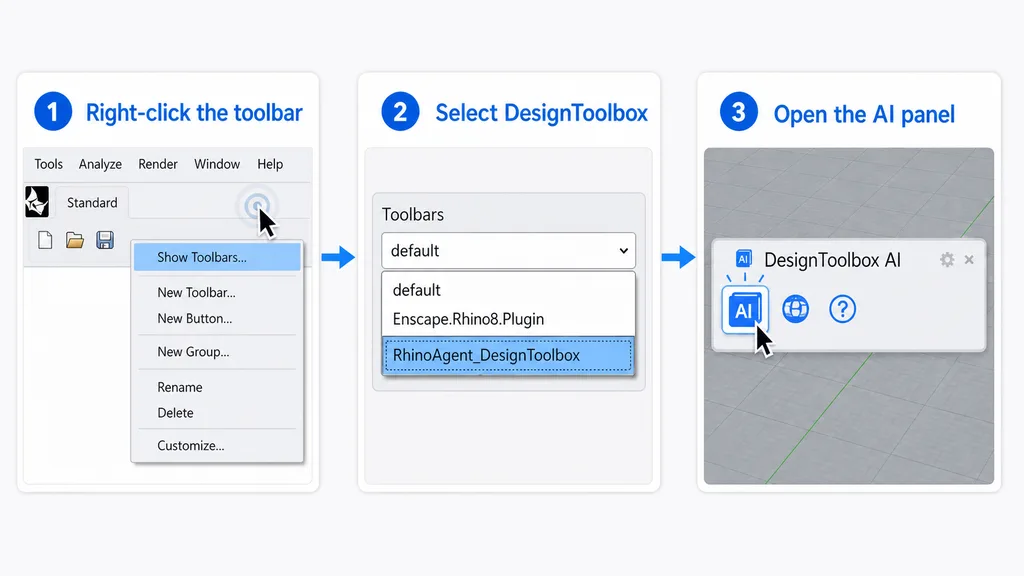
Show the DesignToolbox toolbar below, or run the DesignToolbox command.
Having trouble? Open the PackageManager firewall guide.
The plugin requires Rhino 8.30 or later on Windows. Rhino 7 and Rhino 8 versions before SR30 are not supported.
Yes. Fast conversational mode is free. Higher agent modes and cloud generation workflows can use credits; the interface identifies usage-based options before you start.
No prior Grasshopper expertise is required to ask for a parametric workflow. Familiarity still helps when reviewing and extending the resulting definition.
Yes. The agent can use the active document and the current Rhino selection as context. Review the visible action cards and use Rhino undo whenever you want to roll back a change.
An internet connection is required for AI requests and cloud generation. Rhino operations are executed through the installed plugin inside the active Rhino session.
The link opens Rhino 8 PackageManager and searches for DesignToolbox. Review the package in Rhino, then click Install.
First confirm that Rhino 8.30 or later is installed. If Windows Firewall has an outbound block rule for Rhino, follow the firewall troubleshooting guide to review it safely. On a managed work or school computer, contact your administrator.
Open Rhino PackageManager, review DesignToolbox and install the agent for your Rhino and Grasshopper workflow.
Rhino 8.30+ · Windows · Fast mode free · PackageManager